Overview
The Hotkeys panel is on the right side of the Mx. Voice window. It lets you assign songs to the F1 through F12 function keys for instant one-key playback during a show. You get 5 tabs of hotkey sets, so you can prepare up to 60 songs for quick access.
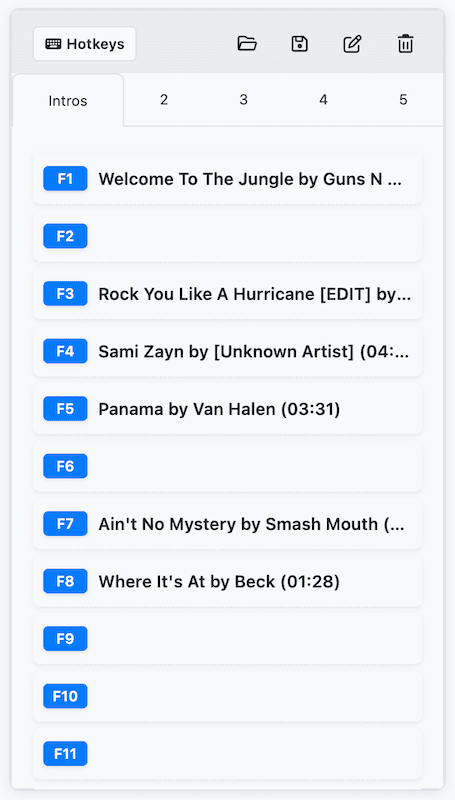
Assigning Songs to Hotkeys
There are two ways to assign a song to a hotkey:
- Drag and drop — Drag a song from the search results and drop it onto any F-key button (F1–F12).
- Tab key — Select a song in the search results and press Tab. The song is assigned to the first empty hotkey slot.
If you drag a song onto a hotkey that’s already occupied, the new song replaces the old one. If the song you’re dragging is already assigned to a different hotkey, the two assignments swap.
Playing Hotkeys
Once a song is assigned, you can play it instantly:
- Press the corresponding F1–F12 key on your keyboard.
- Double-click the hotkey button in the panel.
Hotkey Tabs
There are 5 numbered tabs at the top of the hotkeys panel. Each tab holds a separate set of 12 hotkey assignments, giving you up to 60 hotkeys total.
- Switch tabs by clicking the tab numbers (1–5).
- Rename a tab by clicking the pencil icon in the header. Give each tab a descriptive name like “Intro”, “Halftime”, or “Endings”.
Removing Hotkeys
- Remove one — Select a hotkey and press Delete or Backspace.
- Clear all — Click the trash icon in the hotkeys header to clear every assignment in the current tab.
Importing and Exporting
You can save and load hotkey configurations as .mrv files, making it easy to prepare setups in advance or share them between profiles.
- Export — Click the save icon in the header to save the current tab’s hotkey set to a .mrv file.
- Import — Click the folder icon in the header to load a previously saved .mrv file into the current tab.
Right-Click Menu
Right-click on any hotkey assignment to see a context menu with these options:
- Play — Play the assigned song.
- Edit — Edit the song’s metadata.
- Remove from Hotkey — Remove the assignment without deleting the song from your library.
Keyboard Shortcuts
| Shortcut | Action |
|---|---|
| F1–F12 | Play the assigned song |
| Tab | Assign selected song to the first empty slot |
| Delete / Backspace | Remove the selected hotkey assignment |
| Cmd/Ctrl+1–5 | Switch to hotkey tab 1–5 |
| Cmd/Ctrl+O | Open a hotkeys file |
| Cmd/Ctrl+S | Save hotkeys to a file |