Overview
The Holding Tank is on the left side of the Mx. Voice window. It’s a staging area where you can collect songs for a show. It operates in two modes: Storage for individual access, or Playlist for automatic sequential playback.
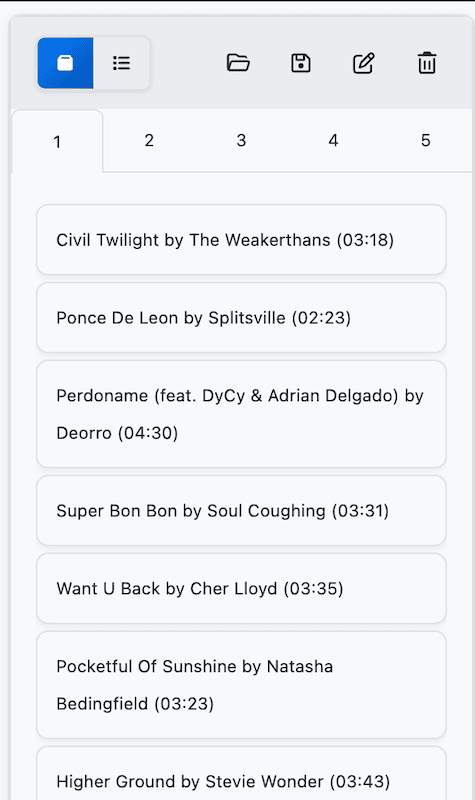
Storage vs. Playlist Mode
Use the two mode buttons in the holding tank header to switch between modes.
| Mode | Behavior |
|---|---|
| Storage (default) | Songs are played individually. Click a song to select it, double-click to play. Playback stops at the end of each song. |
| Playlist | Songs play automatically in sequence. When one song ends, the next starts. A speaker icon indicates the currently playing track. |
Adding Songs
- Drag and drop — Drag a song from the search results into the holding tank list.
- Shift+Tab — Select a song in the search results and press Shift+Tab to add it to the holding tank.
Songs can be reordered by dragging them within the holding tank list.
Tabs
Like hotkeys, the holding tank has 5 tabs for organizing different groups of songs. Each tab maintains its own song list independently.
- Switch tabs by clicking the tab numbers (1–5).
- Rename a tab by clicking the pencil icon in the header.
Removing Songs
- Remove one — Select a song and press Delete to remove it from the list.
- Clear all — Click the trash icon in the header to empty the current tab. A confirmation dialog appears first.
Importing and Exporting
Save and load holding tank lists as .hld files. This is useful for preparing setlists in advance.
- Export — Click the save icon to save the current tab’s song list.
- Import — Click the folder icon to load a saved .hld file into the current tab.
Right-Click Menu
Right-click on any song in the holding tank to see a context menu with these options:
- Play — Play the song.
- Edit — Edit the song’s metadata.
- Remove from Holding Tank — Remove the song from the list without deleting it from your library.
Keyboard Shortcuts
| Shortcut | Action |
|---|---|
| Shift+Tab | Add selected song to the holding tank |
| Delete | Remove selected song from the holding tank |